做migo投料报警告说“凭证 不包含可选项”,虽然是警告但无法过账
具体内容是: DiagnosisThe document or document item entered cannot be adopted.
Possible reasons for this are:
The document items have already been processed
(Suggest zero lines indicator set?).
the document items have been deleted or are blocked.
the document items have been created for a different plant.
(for reservations only) movements are not yet allowed for the reservation items.
(for reservations only) the document items are retrograde components of the order. These are posted using the order confirmations.
A [url=sapeventOCU_LINK\DS:GLOS.3526BF24AFAB52B9E10000009B38F974]confirmation[/url] must exist for the document items.
The document items must be released first.
The document is an R/2 document.
ProcedureMake sure your entries are correct.
If the system has already processed the total quantity, you can set the Suggest zero lines indicator. The system will suggest the quantity zero for the items that have already been processed.
If you have entered a particular item, cancel the item. If you do not enter an item, the system searches all of the open items in the document.
If the document is a purchase order, production order or a reservation, you can enter search criteria in the dialog box.
You access the dialog box by choosing Enter with reference on the initial screen.
 加载中...



 IP卡
IP卡 狗仔卡
狗仔卡 发表于 2015-7-20 11:37:41
 OCU_LINK\DS:GLOS.3526BF24AFAB52B9E10000009B38F974]confirmation[/url] must exist for the document items.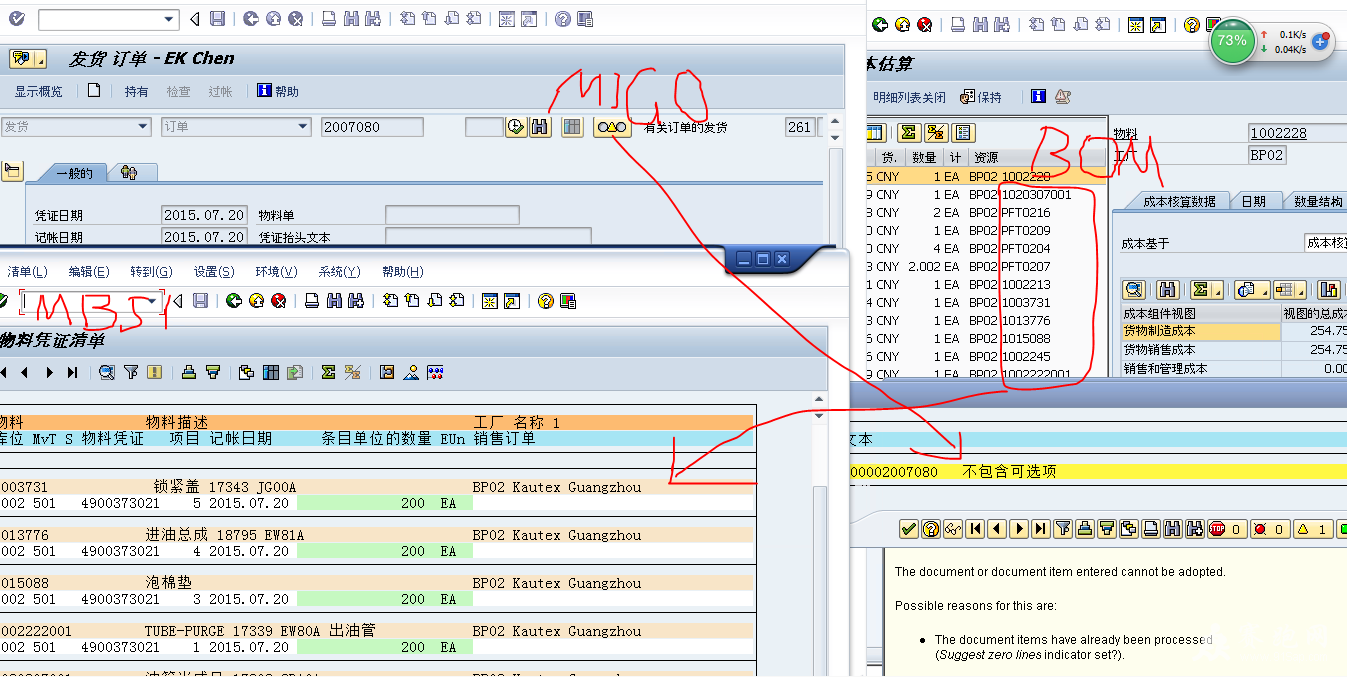
 提升卡
提升卡 置顶卡
置顶卡 沉默卡
沉默卡 喧嚣卡
喧嚣卡 鍙樿壊鍗
鍙樿壊鍗 鏄捐韩鍗
鏄捐韩鍗 发表于 2015-7-24 21:32:58
 楼主
楼主