In order to settle AuC to Expenses, there are two ways to do it.
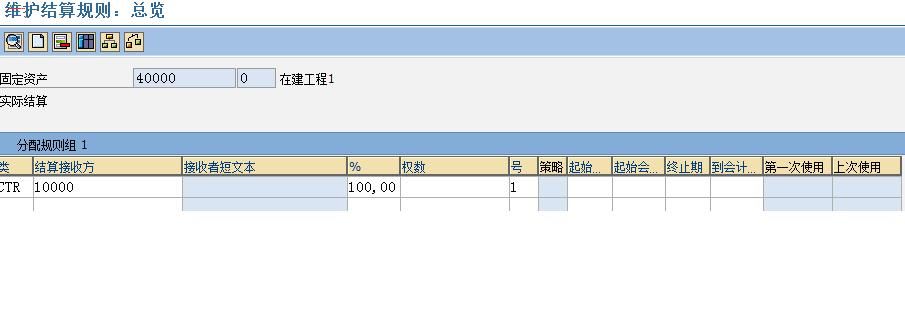
1) Settle AuC to G/L Accounts:
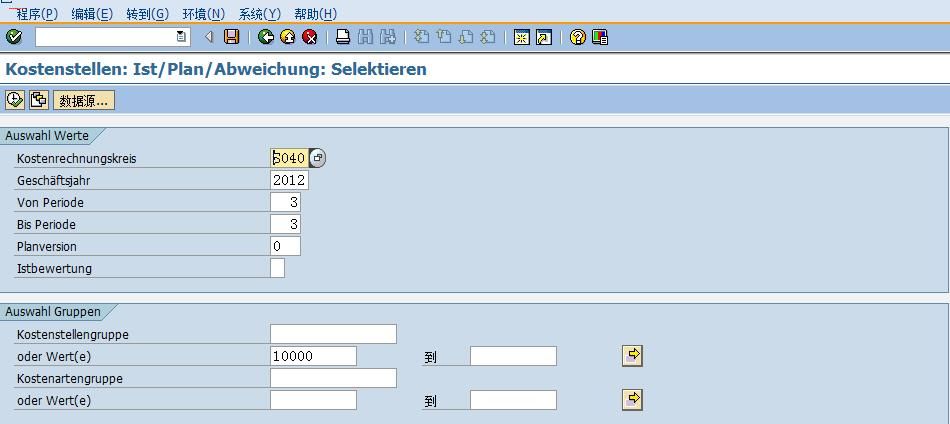
You need to set your settlement profile to be G/L Account enabled. However, most expense accounts (Cost Elements) require CO Objects (normally is Cost Center) and in AIAB don't have any field referred to Cost Center. Therefore, you have to assign default Cost Center for your Cost Element via OKB9. T ...
In order to settle AuC to Expenses, there are two ways to do it.
1) Settle AuC to G/L Accounts:
You need to set your settlement profile to be G/L Account enabled. However, most expense accounts (Cost Elements) require CO Objects (normally is Cost Center) and in AIAB don't have any field referred to Cost Center. Therefore, you have to assign default Cost Center for your Cost Element via OKB9. Then, the system will know which Cost Center going to be posted. After settlement completed, you don't forget to take your default Cost Center off KOB9 (This is very important thing).
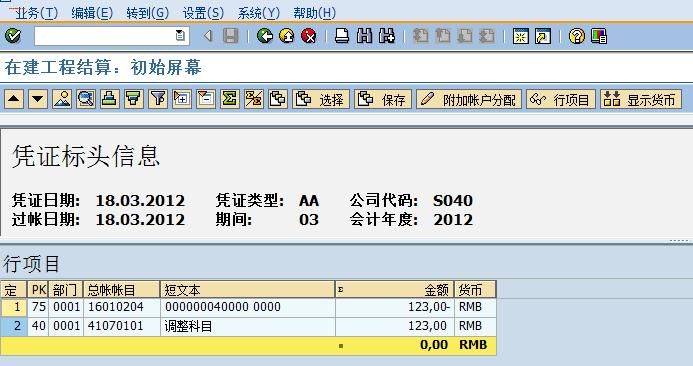
2) Settle AuC to Cost Center:
You need to set your settlement profile to be Cost Center enabled. In this case, you use any account acted as suspense account. And it must be assigned with any target Cost Center in KOB9 as well. After settlement completed, the system transfer AuC value to the account and Cost Center specified in KOB9. After that, you have to adjust it by offset posting with your Expense Account.
 加载中...



 IP卡
IP卡 狗仔卡
狗仔卡 发表于 2012-3-18 11:58:22
 提升卡
提升卡 置顶卡
置顶卡 沉默卡
沉默卡 喧嚣卡
喧嚣卡 鍙樿壊鍗
鍙樿壊鍗 鏄捐韩鍗
鏄捐韩鍗 发表于 2012-3-18 11:58:23

 楼主
楼主


 发表于 2013-7-30 08:50:35